Operator interfaces that work in everyday use
On a machine, the user interface determines how quickly operators work, how often they need to ask for help and how many mistakes happen. A good HMI (human machine interface) shows what matters at a glance, guides people safely through rare procedures and reports problems in a way that makes clear what to do. A poor HMI costs time every day – and shapes how your customers perceive the entire machine.
Bitclipse designs and develops user interfaces for machines and devices made by industrial and technology companies in Switzerland, Germany and Austria. We combine technical understanding with careful design: from the operating concept and the visual design to the finished interface on the device, implemented with Embedded Wizard.
Good operation follows a few simple rules: frequent tasks need few steps, risky actions need a clear confirmation, and the current state of the machine is always visible. Fonts, contrast and controls must suit the environment in which people work. We do not apply these rules by gut feeling but test them early with a prototype.
Your machine is already running, but its interface is showing its age? Then read how we modernise legacy machine interfaces.
What you get
- An operating concept: which screens there are, how to move between them and which information appears where
- A consistent design: layout, colours, icons and states that remain easy to read from a little distance and in poor light
- Understandable messages and warnings that say what has happened and what the operator should do now
- A prototype you can click through on a PC before the interface runs on the device
- Implementation of the interface with Embedded Wizard
- Multilingual interfaces for machines that are delivered to different countries
- Coordination with your development team, so that the interface is cleanly connected to the device software
Typical uses
Machine controls
Control panels for production machines on which operators set up jobs, adjust values and monitor the process.
Devices with a display
Interfaces for technical devices where memory and computing power are limited but operation still has to feel smooth.
Service and set-up
Areas for technicians with diagnostics, settings and logs – clearly separated from day-to-day operation.
New product generation
A uniform interface for an entire product family, so that operators immediately find their way around every machine.
How a project works
- Understanding: We get to know the machine, its operators and the most important procedures – ideally where the machine is in use.
- Operating concept: We define screens, navigation and messages and discuss them with you and, where possible, with future operators.
- Design and prototype: The concept becomes a visual design and a clickable prototype for early feedback.
- Implementation: We implement the interface with Embedded Wizard and coordinate the connection to the device software with your team.
- Testing and handover: We check the interface on the target device, fix anything unusual and hand everything over with documentation.
Technology: Embedded Wizard
For implementation we work with Embedded Wizard, a tool that specialises in graphical user interfaces for devices and machines. It produces interfaces that run smoothly even on hardware with little memory, and the interface can already be tried out on a PC before it runs on the device. That way you see early on how operation feels, and changes are still inexpensive at this stage.
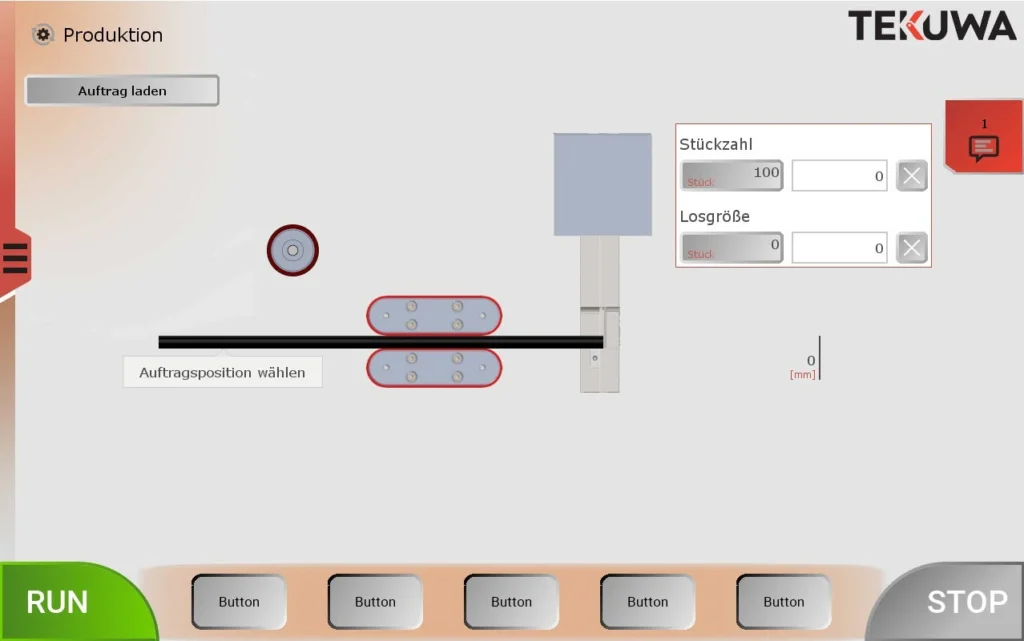
One example is the machine GUI for Tekuwa GmbH: complete GUI planning and interface design for an industrial machine control, with the aim of making complex functions accessible through a clear, efficient interface.
Frequently asked questions
What is an HMI?
HMI stands for human machine interface. It covers everything a person uses to operate and monitor a machine – today usually a touch display with a graphical user interface.
How much does HMI development cost?
That depends on how many screens and procedures the machine has and on whether we only provide the concept and design or also the implementation. After the initial conversation you receive a quote with a clear cost range.
Can you deliver only the operating concept and the design?
Yes. If your team handles the implementation itself, we deliver the operating concept, design and prototype and are available for questions during implementation.
When should we start planning the HMI?
As early as possible, in parallel with the development of the machine. Then the needs of the operators can still influence the choice of display and controls, and the interface is ready when the machine is.
Do you also work with machine builders in Germany and Austria?
Yes. Most of the collaboration takes place via video calls and regular interim versions that you can try out on a PC yourself. Meetings on site are possible by arrangement.
Who owns the design and the source code?
We agree on this in writing before the project starts. As a rule, the design and the source code of the interface pass to you, so that you can develop your machine further independently.